Ctrl+K
🔨 Malet - Home 🔨 Malet - Home

Getting Started

  • Installation
  • Quick Start
    • Prerequisites
    • Running Experiments
    • Grid Configuration

Plotting

  • Plotting Guide
    • Plot gallery
    • Overview
    • Curve Plots
    • Bar Charts
    • Heatmaps
    • Scatter Plots
    • Multi-Line Plots
    • Multi-Plot Grids
    • Animated Plots (GIF)
    • Styling and Configuration

Guides

  • Parallel Grid Splitting
  • Intermediate Checkpointing
  • Merging Log Files
  • Weights & Biases Integration

Examples & Reference

  • Examples & Templates
  • ExperimentLog API Reference
  • API Reference
    • malet
      • malet.experiment
      • malet.merge_log
      • malet.plot
      • malet.plot_utils
        • malet.plot_utils.data_processor
        • malet.plot_utils.plot_drawer
        • malet.plot_utils.utils
      • malet.utils

Development

  • Changelog
  • Contributing
  • .md

Plot gallery

Contents

  • Curve plots
  • Scatter plots
  • Multi-plot grids
  • Multi-line
  • Animation (GIF)
  • Other visualizations

Plot gallery#

A visual overview of what Malet can produce. All figures below were generated from real CIFAR-10 ResNet20 experiment logs. Click any heading to jump to the corresponding guide page.

Curve plots#

Training and validation curves with error bands, comparing methods or sweeping hyperparameters.
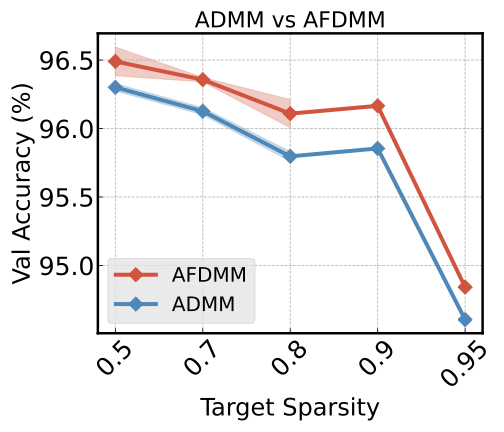
ADMM vs SAFE comparison

ADMM vs SAFE across sparsity levels

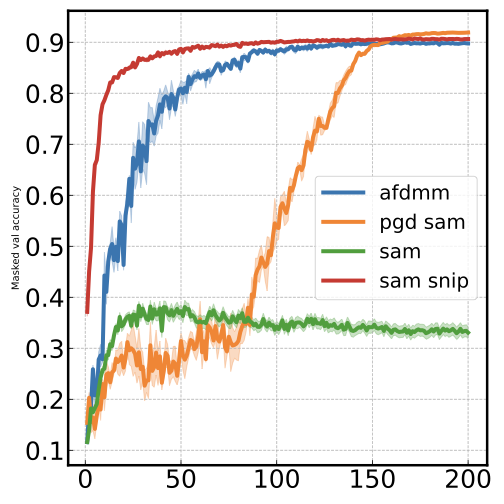
Training dynamics at sparsity 0.9

Training dynamics: masked val accuracy over epochs
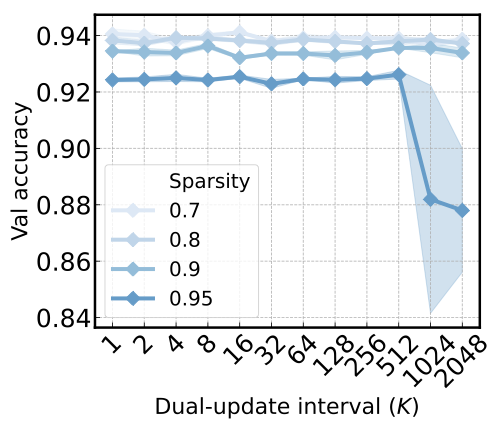
Dual-update interval vs val accuracy

Sequential blue colormap for ordered sparsity levels
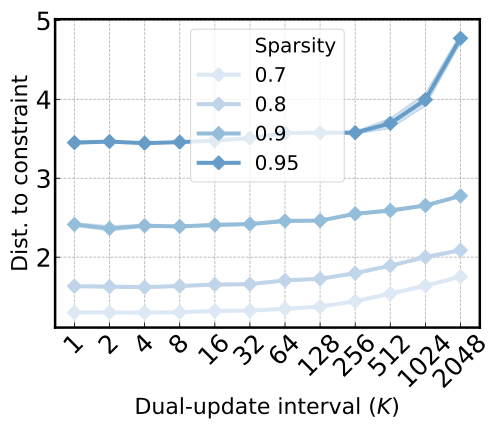
Lambda vs distance to constraint

Log-log curve: penalty vs constraint distance

Scatter plots#

Metric-vs-metric relationships with multi-line encoding (color + marker shape).
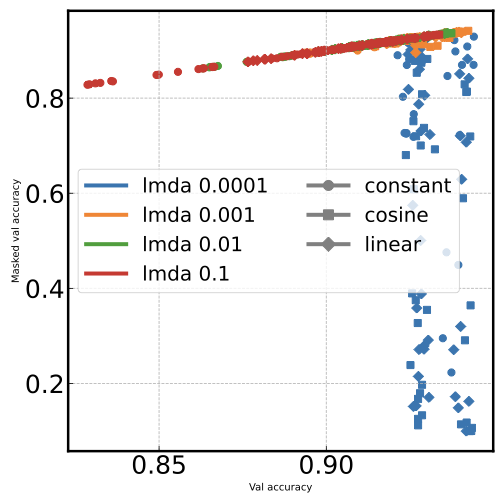
Scatter with dual encoding

Color = lambda, marker = schedule (dual multi-line)
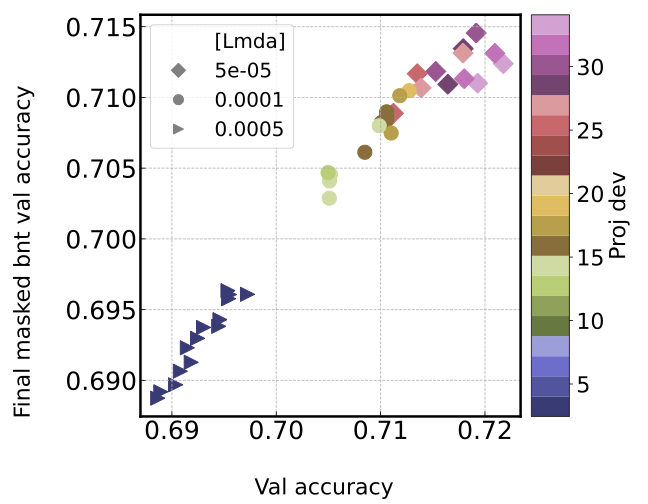
Scatter with continuous colorbar

Marker = lambda, color = proj dev (continuous colorbar)

Multi-plot grids#

Subplot grids split by one or two fields.

4x4 faceted scatter grid

4x4 grid by lambda (columns) x sparsity schedule (rows), colored by proj dev

3x4 faceted scatter grid

3x4 grid by lambda x lambda schedule

Multi-line#

Multiple curves on the same axes. Ordered numeric fields get sequential colormaps automatically.
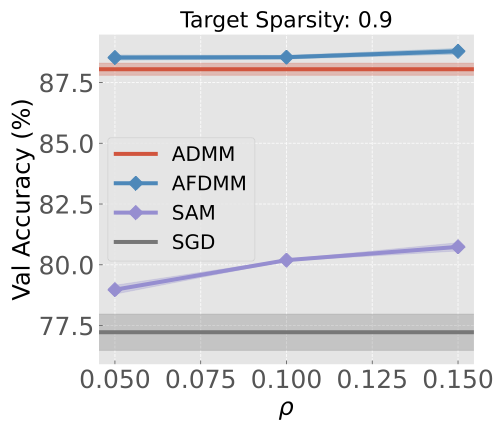
Four methods compared at sparsity 0.9

Tab10 palette: ADMM, SAFE, SAM, SGD at sparsity 0.9
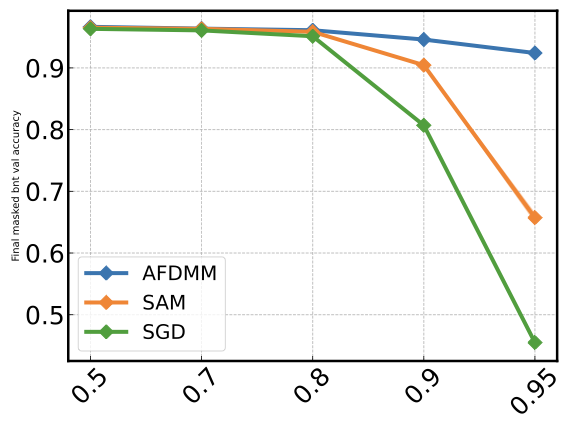
Three methods across sparsities

Method comparison across sparsity levels

Animation (GIF)#

Animate any plot type over time. The x-axis shows hyperparameters; the animation field (epoch/step) drives the frames.
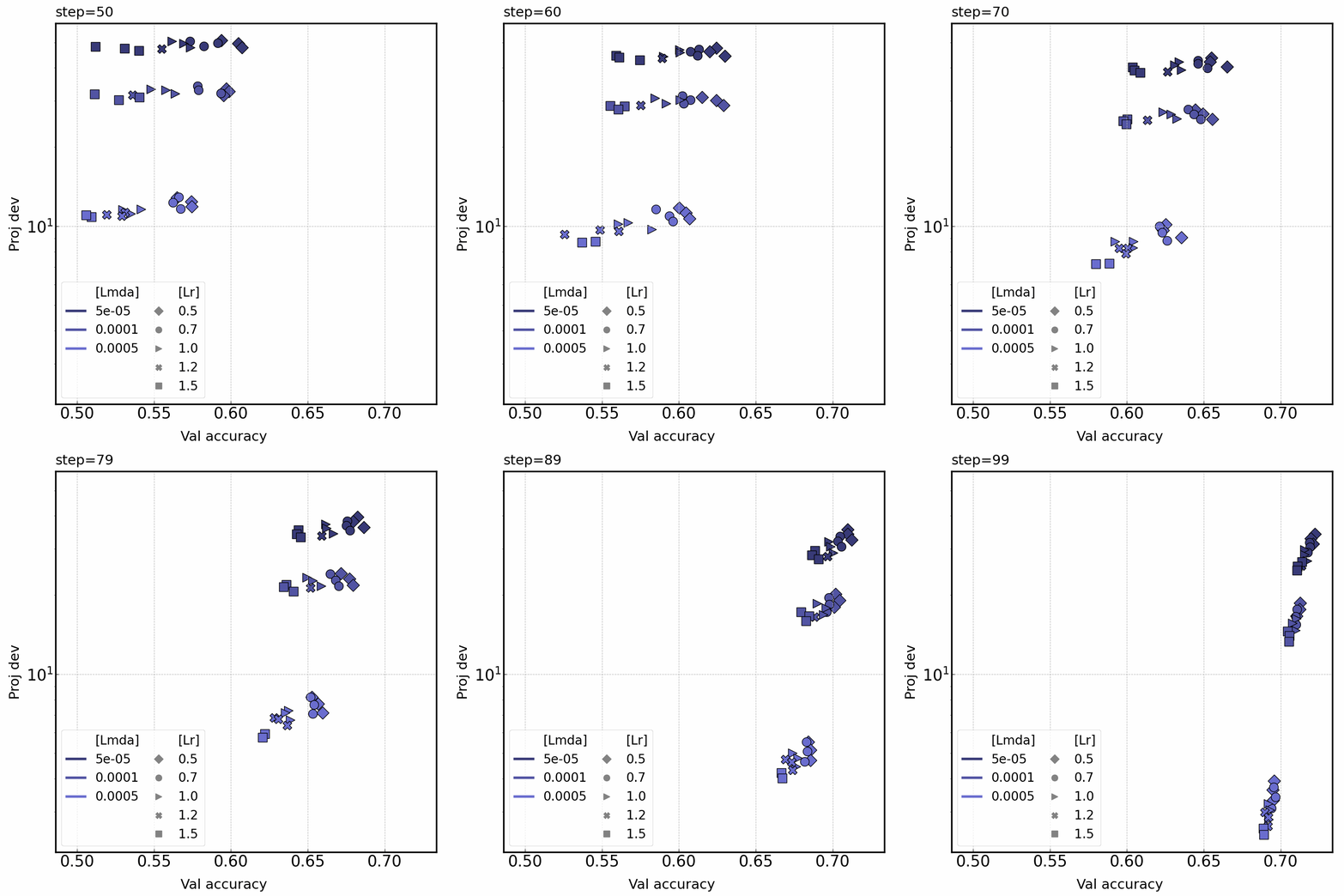
Animated scatter over training steps

Scatter animated over steps: color = lambda, marker = lr
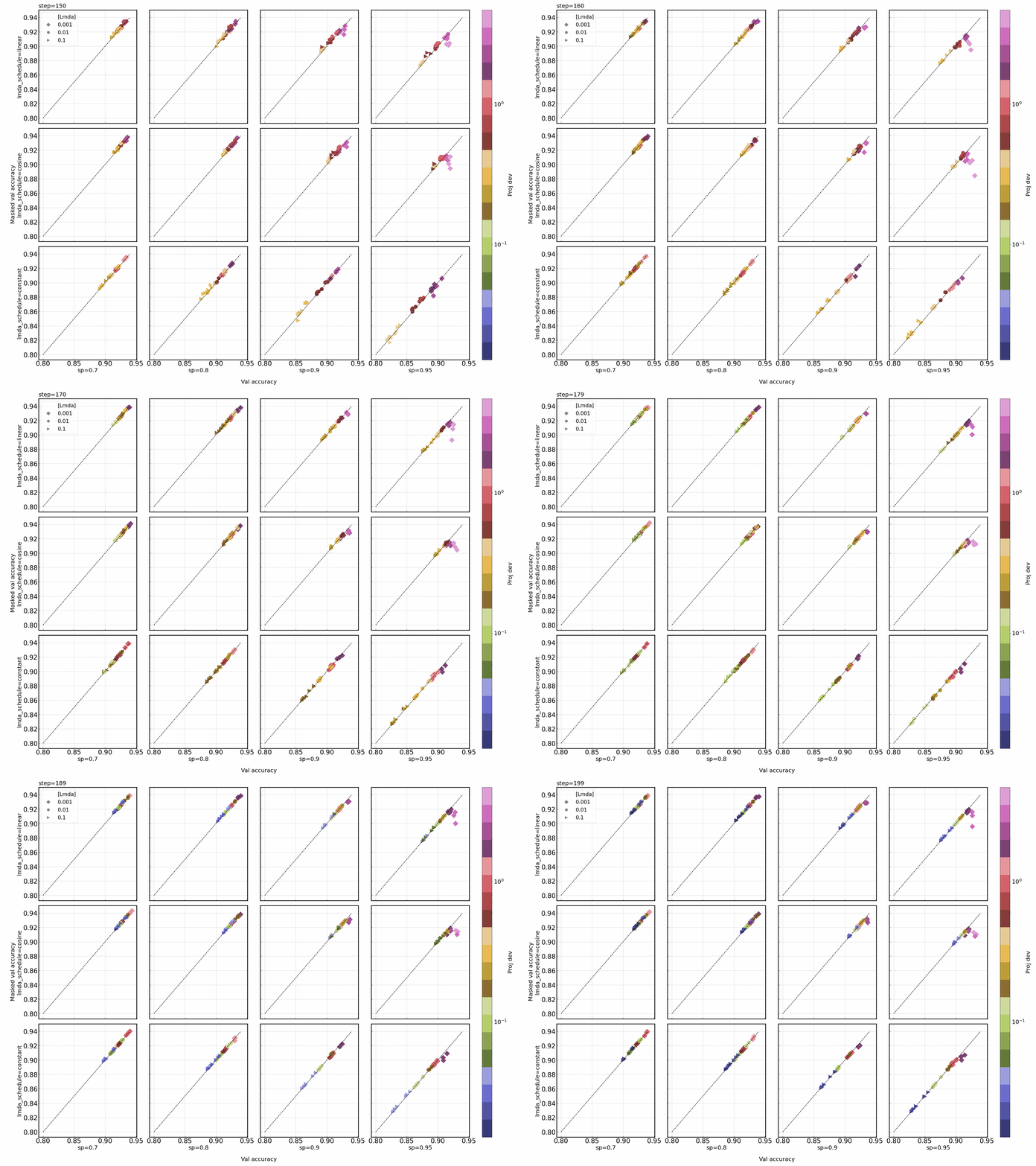
Animated multi-plot scatter

Faceted scatter animated over late training

Other visualizations#

Loss landscapes and custom analysis plots.
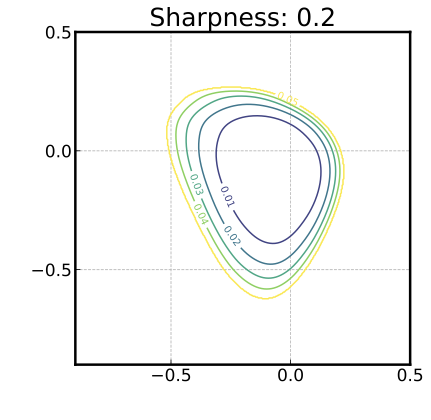
ADMM loss landscape

ADMM loss landscape (sharpness: 0.2)

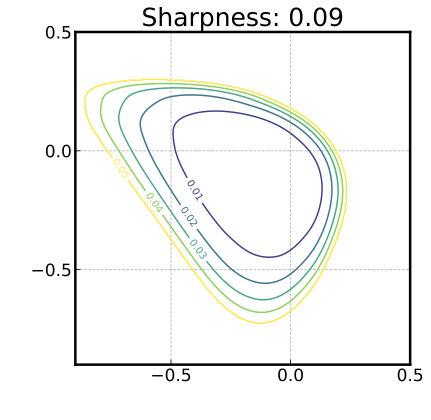
SAFE loss landscape

SAFE loss landscape (sharpness: 0.09 — flatter minimum)
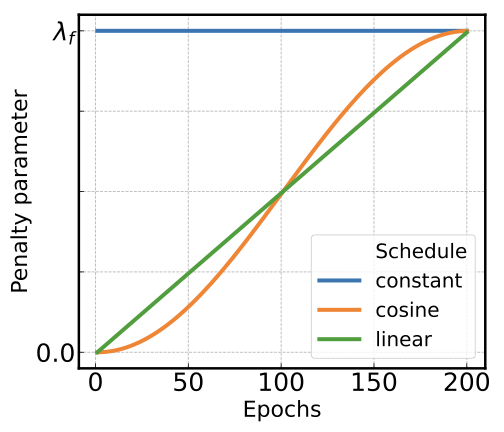
Lambda schedules

Lambda penalty schedules: constant, cosine, linear
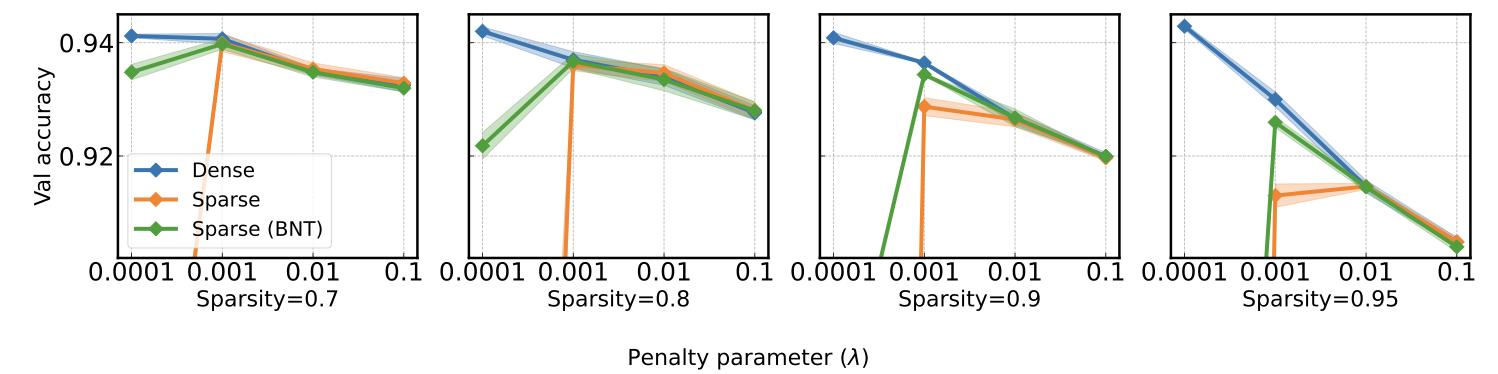
Lambda vs accuracy by sparsity

Dense/sparse/BNT accuracy vs lambda across sparsities

previous

Plotting Guide

next

Overview

Contents
  • Curve plots
  • Scatter plots
  • Multi-plot grids
  • Multi-line
  • Animation (GIF)
  • Other visualizations

By Dongyeop Lee

© Copyright 2024, Dongyeop Lee.